How to Automate Analytics Data Reporting using AI
Estimated reading time: 6 minutes
If your Monday morning ritual involves reviewing Google Analytics dashboards, examining engagement numbers, and trying to work out specific trends or features, then you're not alone. GA4 is genuinely powerful, but it's also genuinely difficult to extract clear, actionable insight from without a lot of manual effort (bring back Universal Analytics).
This guide can help you use AI, supporting you in being a helpful data analyst. Tools like ChatGPT, Co-pilot, Claude, Deepseek and Gemini (and many others) can take your raw GA4 data and turn it into readable performance narratives, trend analysis, and prioritised recommendations, in seconds, not hours. Here's how to set it up, what each tool does well, and where the process still has rough edges you'll need to manage.
What AI Outputs can you use for Analytics Reporting
Before jumping into AI prompts, it's worth being clear on what automated reporting should actually deliver. The most useful outputs we see clients ask for fall into a few key areas:
- Top-performing pages — which content is driving the most sessions, lowest bounce rates, and strongest engagement time. Not just raw traffic, but proportionate performance relative to your overall site.
- Page trend analysis — understanding which pages are growing, plateauing, or quietly declining. A page that was getting 2,000 visits per month six months ago and is now getting 400 needs your attention before it falls off entirely.
- Dead-end pages — pages with high traffic but zero onward journeys, form completions, or event triggers. These are conversion leaks that often go unnoticed in standard reporting dashboards.
- Page speed and Core Web Vitals — GA4 captures loading performance data that, when cross-referenced with your highest-traffic pages, quickly flags where user experience is actively costing you rankings and conversions.
- Search queries — blending GA4 with Google Search Console reveals not just what people do when they arrive, but what they searched for to find you (and what you're close to ranking for but not quite reaching yet).
- Top and trending events — custom events, scroll depth, outbound link clicks, form interactions. GA4's event model is rich — AI can help you spot which ones are spiking and whether they correlate with broader traffic or campaign activity.
Blending GA4 with Google Search Console — Why It Matters
GA4 tells you what happens on your site. Search Console tells you why people came in the first place. Together, they paint a much fuller picture.
Specifically, blending the two lets you identify:
- Near-miss keywords— queries where you're ranking in positions 5–15, getting impressions but low clicks. These represent quick SEO wins where improving the page title, meta description, or content depth could move you into page one prominence.
- Click-through rate anomalies — pages ranking well but with low CTR. Often this is a metadata problem rather than a content problem.
- Content gaps — queries people are using to find you that you don't have dedicated content for yet.
- Page-level attribution — mapping specific landing pages back to the queries that drive them, so you can optimise both together.
You can export data from both platforms and feed them to an AI model simultaneously.
The instruction is simple: "Here is GA4 landing page performance for the last 90 days, and here is Search Console query data for the same period. Cross-reference by URL and tell me which pages have strong impressions but weak CTR, and which pages have high traffic but poor engagement." That's the kind of analysis that used to take an analyst a few hours of review. With a well-structured data export, it takes about three minutes!
How to Set It Up: A Practical Workflow Using AI
Step 1: Export Your Data Cleanly
From Analytics, export the following reports as CSV:
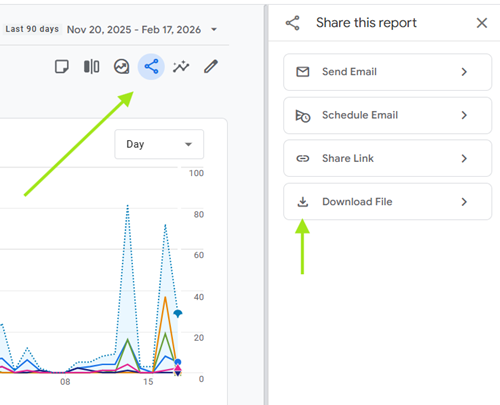
- Engagement > Pages and Screens (sessions, users, engagement rate, average engagement time)
- Engagement > Landing pages (sessions, bounce rate, conversions)
- Engagement > (Event name, count, user count — filtered to your key events)
- Tech > Overview (page load time if captured via custom dimensions)
From Search Console, export:
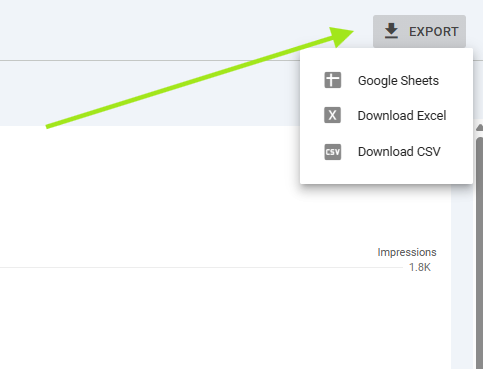
- Performance > Pages (impressions, clicks, CTR, average position)
- Performance > Queries (same metrics)
Keep your date ranges consistent. 90 days gives a useful spread without being so long that old anomalies skew your picture.
Step 2: Choose Your AI Tool
Most major tools such as ChatGPT, Claude, Gemini and Co-Pilot; handle structured data analysis, but with some meaningful differences in practice.
ChatGPT is particularly strong at pattern recognition within tabular data. Its code interpreter mode can process your CSV directly without you needing to paste data manually. You can upload files, ask questions conversationally, and generate charts within the interface. For recurring reporting, you can use the OpenAI API to automate ingestion and output entirely.
Claude tends to excel at narrative output — turning data into structured, readable summaries that are close to ready for a client presentation or internal report. It's notably strong at handling nuance, flagging anomalies in context rather than just listing them, and producing prioritised recommendations in plain English. Claude can also receive CSV content directly via upload.
Gemini (particularly Gemini Advanced with Google Workspace integration) has the advantage of native connectivity to Google products. If your team works in Google Sheets, Gemini can query your Analytics-linked data directly — removing the export step entirely. For organisations already embedded in the Google ecosystem, this is a significant workflow efficiency.
Microsoft Copilot (particularly Copilot with Microsoft 365 integration) deserves a mention here, especially if your team is heavily invested in the Microsoft ecosystem. Copilot can work directly with Excel files, Power BI reports, and SharePoint-hosted data without manual exports. Where it becomes particularly useful is in organisations already running their analytics pipelines through Power BI or Azure — Copilot can query these data sources conversationally and produce summaries, trend analyses, and anomaly flags in natural language. The integration is tighter than copying CSVs between platforms, but the trade-off is that Copilot's analytical depth on complex, multi-variable GA4 datasets currently lags behind ChatGPT and Claude. It's strongest when your reporting workflow is already Microsoft-native and you're looking to add a conversational layer on top of existing dashboards rather than build standalone analysis from raw exports.
Step 3: Write Effective Prompts
The quality of your analysis depends heavily on how you frame your request. Vague prompts produce vague outputs. Using tools such as Prompt Cowboy can help create an optimsed request. Ensure you have your prompts saved in a cheat sheet or guide sheet to re-reference or ensure you re-use the same prompt chat to re-train the model on your historic values.
Instead of: "Analyse my GA4 data" try using: "You are a digital analyst reviewing 90 days of website performance data for a B2B professional services firm. Attached is landing page data from GA4 and query data from Search Console. Please: (1) identify the top 5 performing pages by engagement rate and sessions, (2) identify any pages with strong impressions but CTR below 2%, (3) flag any pages with declining sessions month-on-month, and (4) highlight the three most urgent actions based on this data."
Then using Prompt Cowboy you can elaborate even further asking for specific prompt structure to return better success and focus the prompt as an analysis of data. Use the results to the prompt your preferred model with your specific datasets.
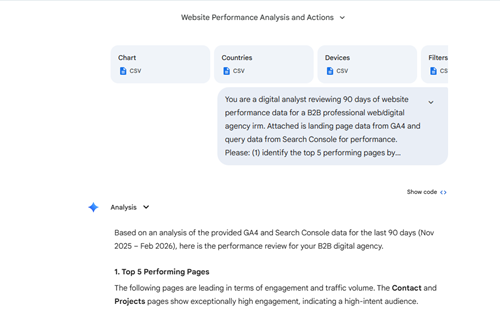
The more context you give — sector, business goals, KPI's, what you've already done for previous reports, what you're trying to achieve — the more useful the output.
Step 4: Automate the Recurring Workflow
For teams producing regular performance reports, the real efficiency gain is removing the manual steps entirely. The cleanest architecture involves ideas such as:
- A Google Looker Studio connection pushing data to Google Sheets on a schedule.
- A script that formats the export and sends it to an AI API (OpenAI, Anthropic, or Google)
- The AI generates a structured report, which is either emailed, posted to Slack/Teams, or written back to a Sheets tab.
Some of these steps can be created using no-code workflow management tools such as Zapier, Power Automate (O365 suite application) or AI enabled workflow tools such as n8n.io. This can realistically be set up in a day or two of development time and eliminates what is often several hours of reporting work per week. If you want support scoping or building this kind of pipeline, it's exactly the type of project we take on at NXT Digital Solutions.
Real-World Examples of What AI Can Surface
To make this concrete, here are the kinds of insights a well-structured AI reporting workflow will surface — based on typical patterns we see across some of our client websites.
Page trend decline detected: "Your /services/web-design page has seen a 34% drop in sessions over the past 60 days. Search Console shows impressions are stable, suggesting the issue may be a drop in click-through rate rather than reduced search demand. The meta description was last updated 18 months ago and no longer reflects current service positioning."
Dead-end content flagged: "The /case-studies section receives 8900 sessions per month but has a 91% exit rate with no recorded events. There are no internal links from this section to service pages and no CTA elements tracked. Users are reading and leaving."
Near-miss keyword opportunity: "The query 'Umbraco CMS agency uk' is generating 12,000 impressions per month at an average position of 9.4 with a 1.8% CTR. A targeted optimisation of the /umbraco-cms landing page title and introduction could move this into the top 5."
Trending event insight: "Contact form start events have increased 28% over the past 30 days, but form submission completions have not increased proportionally. There may be a friction point or technical issue part-way through the form journey."
These are not hypothetical outputs — they're the kind of signals that sit in your data right now, invisible until they have been considered for deeper analysis which is where AI offers decent value to your marketing teams.
Risks and Manual Bottlenecks to Be Aware Of
AI-powered analytics is genuinely useful, but it comes with limitations that are worth understanding before you commit to a workflow.
Data quality is everything
AI can only analyse what you give it. If your GA4 setup has misconfigured events, missing goals, or inconsistent URL structures (trailing slashes, campaign parameters, subdomain fragmentation), the AI will analyse the wrong thing confidently. A GA4 audit before implementing AI reporting is not optional — it's the foundation.
AI can't replace strategic judgement
It will tell you that a page's traffic has dropped. It won't know that you're running a paid campaign that's cannibalising organic traffic to that page, or that you deliberately de-prioritised that service line last quarter. Context that lives in your business doesn't live in your data export but it does flag areas to consider.
Hallucination risk with small datasets
Smaller sites with low traffic volumes can produce data where statistical noise looks like a trend. An AI model may identify a "significant" change in a page that went from 12 sessions to 8 sessions. Always apply a minimum-traffic threshold when setting up your prompts.
Attribution gaps in GA4
GA4's default attribution model (data-driven) can obscure the true contribution of organic search to conversions. When blending with Search Console, remember you're combining a last-touch or modelled model with position data, the relationship isn't always direct.
API rate limits and cost
If you're automating this at scale — multiple clients, multiple properties — API call costs and rate limits from the AI providers become relevant. Build cost controls into any automated pipeline and monitor usage from day one.
Ongoing prompt maintenance
The reports are only as good as the prompts. As your site structure evolves, your reporting prompts need to evolve too. This is a genuinely manual dependency that teams often underestimate.
Getting Started Without the Overhead
You don't need an automated pipeline to get value from AI analytics today. Start simple:
1. Export your last 90 days of landing page data and Search Console queries
2. Open your preferred AI model and upload both files (being mindful of data security)
3. Ask for the five biggest performance opportunities and the three most urgent issues
4. Take the output and sense-check it against what you know about the business
That's a useful, actionable insight report produced in under 15 minutes — without a dashboard, without a developer, and without a data analyst on retainer. Once you've validated the process and understand the quality of outputs you're getting, then it's worth investing in prompt development, expansion then automation.
In Conclusion
The agencies and in-house teams getting ahead right now aren't necessarily those with the most sophisticated analytics stacks. They're the ones who've figured out how to extract clear decisions from the data they already have — faster and more consistently than their competitors. AI reporting tools aren't going to replace strategic thinking. But they will replace a significant chunk of the manual, time-consuming work that currently sits between your data and your decisions. That's time better spent on the work that actually moves things forward. If you want to explore what an AI-augmented reporting setup could look like for your website — or if you want to start with a GA4 audit to make sure the data underneath it is reliable — we're happy to have that conversation.
NXT Digital Solutions is a full-service web agency based in Guildford, Surrey, specialising in web design, .NET application development, Umbraco CMS, and AI integrations. We've been building and optimising digital systems since 2002.
Get in touch with the NXT team


